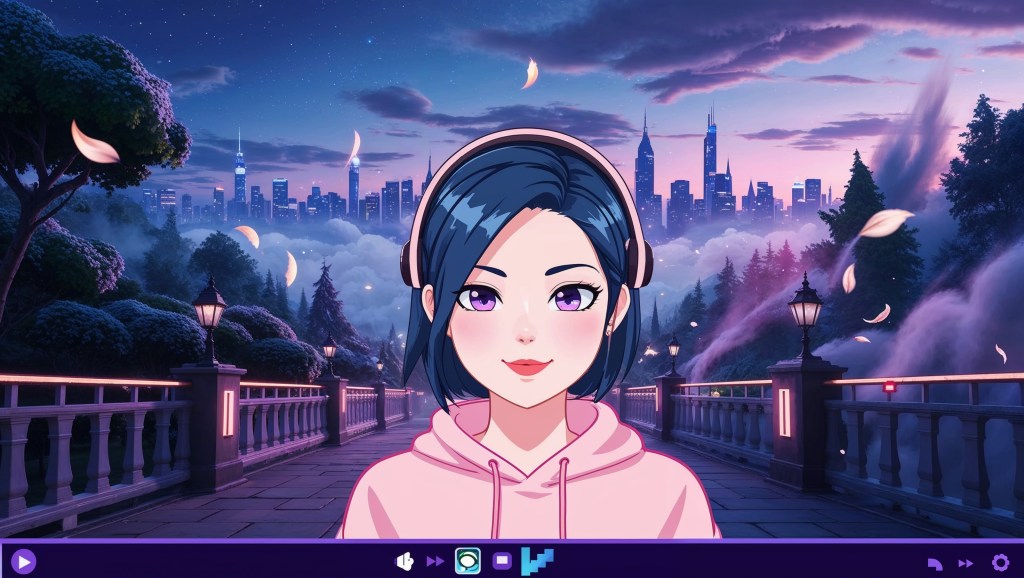
If your stream still feels flat, it might be time to bring your background to life. Enter the parallax background, a visual trick that’s transforming how Gen Z VTubers craft their scenes. This powerful technique adds movement, realism, and that aesthetic edge every VTuber craves.
You’ve seen it. That subtle camera motion that makes it feel like your avatar is standing in a dynamic space. Maybe it’s a futuristic skyline slowly shifting behind you or a dreamy forest with animated light rays filtering through trees. That’s the magic of parallax. And no, you don’t need a 3D model to pull it off. So how do you do it? Is it hard? Expensive? Worth it? Let’s dive deep.
What Is a Parallax Background in VTubing?
A parallax background uses multiple image layers that move at different speeds when you shift your camera view or avatar position. This creates the illusion of depth, turning flat images into immersive, dimensional spaces. Think anime game cutscenes or classic 2D platformers.
For VTubers, this means your scene no longer looks static or fake. Instead, your stream has a living, breathing background that complements your VTuber avatar and brand.
Even with a 2D model, a parallax setup can add just enough movement to keep things visually engaging. It’s subtle, but viewers notice. And it makes your content feel more professional.
Why VTubers Are Loving the Parallax Effect?
More and more VTubers are turning to parallax backgrounds to make their streams feel alive, immersive, and uniquely their own. It’s the perfect way to stand out and add depth without needing a full 3D setup.
A static JPEG backdrop screams “default.” But a parallax scene? That says you’re intentional. Immersive. Aesthetic.
Here’s why parallax backgrounds hit different:
- ✨ They make your stream feel cinematic
- 🔍 Viewers subconsciously pay more attention to movement
- 🚀 You stand out in a crowded sea of flat setups
- 🤓 They hint at world-building and deeper character lore
Whether you’re an anime girl streaming cozy horror games or a digital fox DJing on Twitch, parallax takes your presentation from “just fine” to “woah.”
Real Use Cases: Let Your Lore Live
Let’s say your character is a futuristic bounty hunter. Why use a static sci-fi corridor when you could have animated lights, a floating drone in the corner, and a shifting space skyline?
Or maybe you’re a forest nymph VTuber. Add a layered scene with wind-blown leaves, flowing water, and light shafts filtering through animated trees. Suddenly, your entire stream reflects your VTuber model‘s story.
This is the difference between an avatar just existing on screen and one living in a world.
Tools to Create Stunning Parallax VTuber Backgrounds
You don’t need to break the bank or be a tech wizard to add parallax to your scenes. Here are some Gen Z-friendly tools to bring your backgrounds to life:
1. VTube Studio
This wildly popular app supports native parallax functionality. It works beautifully with iPhone face tracking and layered scenes.
- Go to Settings > Backgrounds > Enable Parallax
- Upload multi-layer PNGs
- Adjust the motion strength for each layer
2. OBS Studio + Plugins
If you’re streaming with OBS, pair it with plugins like Move Transition, StreamFX, or OBS Shaderfilter Plus.
- Create multiple layers with depth offset
- Animate foreground or background objects separately
- Use “Zoom” and “Pan” transitions for subtle camera drift
3. Live2D Cubism (for Advanced Users)
If your model and scene are Live2D-based, you can rig layered background elements directly in the scene.
- Add parallax to the environment during idle animation
- Tie motion to tracking data for dynamic effects
4. TheVTubers.com, Stream Ready Avatars
If building everything from scratch feels overwhelming, TheVTubers.com is a solid shortcut to a professional look. They offer a wide range of plug-and-play VTuber models, themed avatar backgrounds, and stream-ready scene assets—perfect for creators who want to jump in fast without sacrificing quality.
Many of their avatars come paired with matching environments, making them ideal for setting up parallax backgrounds that instantly look cohesive. Whether you’re debuting or upgrading, it’s a go-to resource for streamers who want polished visuals without the hassle.
5. Design Tools
To build your own layered scenes:
- Use Clip Studio Paint, Photoshop, or Krita to export background images in layers
- Canva Pro also supports transparent PNGs, great for simple foreground objects
- Save each element (sky, ground, objects, lighting) separately
How to Set Up a Parallax Scene?
Setting up a parallax scene is easier than it sounds—you just need layered images and the right tools. Here’s a simple step-by-step guide to help you bring depth to your VTuber stream.
📄 Step 1: Build Your Background Layers
Start with at least three visual layers:
- Background (sky, far scenery)
- Midground (buildings, trees)
- Foreground (plants, furniture, railings)
Design with space and motion in mind. Elements closer to the camera should move more.
👁️ Step 2: Import into VTube Studio or OBS
- In VTube Studio, go to Background settings and upload each layer
- In OBS, create multiple image sources and order them by depth
🔄 Step 3: Add Motion
- Enable parallax in VTube Studio
- Use head movement or mouse tracking for subtle shifts
- In OBS, animate layers using Move Transition or manual keyframes
⚖️ Step 4: Test and Adjust
- Calibrate the speed of each layer’s movement
- Make sure the background doesn’t overpower your avatar
- Add subtle ambient motion like flickering lights or rain
Pro Tips to Max Out Parallax Impact
Here’s how to make your parallax background look even better without overdoing it.
✅ Match Your Aesthetic
Your scene should belong to your character. Cyberpunk models need glitchy cityscapes. Forest-themed avatars? Think greenery, magic particles, and flowing water.
✅ Don’t Overdo It
Too much motion can be dizzying. Keep parallax subtle unless your theme is chaotic on purpose.
✅ Use Animated Assets
Even a simple moving PNG of clouds, flickering candles, or blinking signs adds life to your space.
✅ Leave Negative Space
Make sure your avatar model isn’t lost in visual noise. Let the background breathe.
✅ Consider Depth of Field
Blurring background layers slightly can mimic real camera focus and draw more attention to your VTuber avatar.
The Results: From Flat to Fantastic
Ever felt like your stream looked too static, like your anime girl VTuber avatar was just floating in front of a wallpaper? That’s where a parallax background changes the game. It’s more than just eye candy, it’s a mood, a vibe, a whole experience. When your layers move subtly with you, the entire scene feels alive, and so does your character. Suddenly, viewers aren’t just watching a stream, they’re stepping into your world.
For Gen Z VTubers who care about storytelling and aesthetic branding, this added depth isn’t just cool, it’s essential. It signals effort, creativity, and intention. Whether you’re a digital witch with floating books or a space idol in orbit, a parallax setup takes you from flat to fantastic in seconds. It’s that small visual upgrade that makes people stop scrolling and say, “Wait… this looks amazing.” And in a sea of static streams, that makes all the difference.
Final Thoughts
Ultimately, parallax is more than just a design choice; it’s a storytelling tool. With layered motion and clever visual design, you can build an entire mood that complements your VTuber model and keeps your audience hooked. And hey, this is just the beginning. If you thought dynamic backgrounds were impressive, wait until you see what happens when the physical and digital worlds blend.
Check out phygital.my3dselfie.com to see the future of VTubing, where your avatar isn’t just on screen, but on your shelf too. Ready to build your first parallax setup? Need help finding assets? Drop us a message, and we’ll point you to tools, artists, or packs that match your vibe. Because your VTuber world deserves more than a flat JPEG. It deserves depth.


 VtuberLab
Leave a reply to Sofia Cancel reply