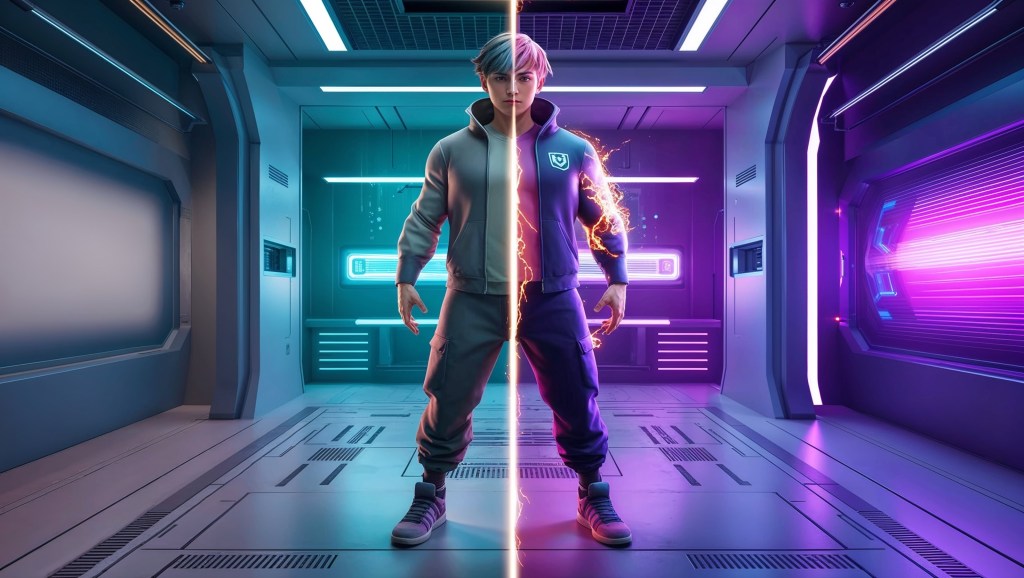
When you watch your favorite VTuber stream, you’re probably drawn in by their personality, design, or voice. But there’s something else that often goes unnoticed, the subtle visual magic that makes their avatar feel “real.” Enter shaders.
In the world of VTubing, shaders are the secret sauce that separates a flat digital puppet from a lifelike, expressive character. From glowing eyes that react to lighting, to soft shadows that wrap around hair strands, shaders are what bring depth, texture, and realism to your VTuber avatar.
This blog dives into how VTuber shaders, Unity effects, and post-processing techniques combine to transform 2D and 3D models into believable characters, and why that realism matters more than ever in 2025’s VTubing landscape.
What Are Shaders? And Why Should VTubers Care?
Shaders are small scripts that tell your computer how to render pixels on screen. In simpler terms: shaders control how your avatar looks under different lighting, how materials behave (like shiny skin or matte clothing), and how effects like glow, transparency, or distortion are applied.
For VTubers, shaders unlock a whole new level of visual storytelling. They:
- Add realism through dynamic lighting and shadowing
- Enhance expressiveness with glowing eyes, sparkles, or tears
- Give your avatar a unique visual identity, beyond just the model design
Think of shaders as your avatar’s makeup artist and lighting crew, working in real time, every stream.
The Shader Playground: Where VTuber Avatars Come to Life?
For 3D VTubers, shaders are the secret sauce behind every glowing outline, reflective jacket, or magical eye effect you’ve ever admired. Whether your avatar ends up in VSeeFace, VTube Studio, or a custom broadcast setup, most creators rely on a real-time engine to apply those visual effects, and that’s where shaders do their magic.
Shaders control how light, texture, and effects interact with different parts of your avatar, from the shimmer in your eyes to the glow in your jacket. Each material (skin, hair, clothes, accessories) can use different shader styles to create just the right vibe.
Here are a few common shader types used in the VTubing space:
- Toon Shaders: Stylized shading that mimics anime aesthetics, with bold highlights, crisp shadows, and a clean 2D-inspired look.
- PBR Shaders (Physically Based Rendering): These make materials look more realistic by simulating how light behaves in the real world, reflections, metallic shine, and soft skin lighting included.
- MatCap Shaders: Great for performance and style, these apply a baked lighting effect that gives a soft, unique look without needing heavy rendering.
- Custom Shader Graphs: Advanced creators use visual editors to build custom effects from scratch, think holographic overlays, glitch animations, magical bursts, or underwater distortions.
If you’ve seen a VTuber with glowing rainbow outlines, breathing particles, or transparent energy waves flowing through their outfit, yep, that’s shader magic at work.
Post-Processing: Turning Real-Time Feeds into Cinematic Visuals
Beyond shaders on the model itself, VTubers can enhance realism using post-processing effects in Unity or broadcasting tools like OBS and Spout.
Post-processing refers to effects applied after the base render — like how films add color grading and lens flares after shooting. In VTubing, common post-processing additions include:
- Bloom: Creates glowing light spill from bright areas (great for neon eyes or LED accessories)
- Ambient Occlusion: Adds subtle shadowing where surfaces meet — giving depth and contact
- Depth of Field: Blurs background elements, focusing attention on your avatar
- Color Grading: Alters mood through hue, contrast, and saturation adjustments
- Motion Blur: Adds fluidity to fast movements, especially head turns and gestures
These aren’t just aesthetic, they emotionally enhance the viewer’s experience. A soft blur and cinematic lighting setup can make even a basic model feel immersive and alive.
Realism vs Stylization: What Shaders Can Do for You
Not every VTuber wants hyper-realism. Many lean toward stylized anime looks, vibrant fantasy designs, or lo-fi aesthetics. But shaders can still serve you, even in stylized forms.
Here’s how shaders enhance both sides of the spectrum:
For Stylized Avatars:
- Custom rim lighting for dramatic outlines
- Sparkle shaders for magical girl aesthetics
- Soft cel-shading with depth-based shadows
- Outline shaders for comic-style visuals
For Realistic Avatars:
- Subsurface scattering for realistic skin glow
- Hair shaders with dynamic specularity and transparency
- Eye shaders that reflect light and react to head tilts
- Cloth shaders with movement-based wrinkle simulations
The key is choosing shaders that align with your VTuber identity. You’re not just adding visual polish — you’re reinforcing your brand, your vibe, your story.
Shader-Based Interactivity: Going Beyond Looks
Some shaders don’t just sit pretty — they respond in real-time.
VTubers are starting to use shaders that:
- Change based on emotions (angry → glowing red eyes)
- Respond to voice volume (shaders that pulse with your voice)
- Shift color during live stream milestones (like sub goals or raids)
- React to lighting from external sources (webcam, room light, or game environment)
These interactive shaders bring an immersive layer of performance to your stream. Your avatar doesn’t just look good — it responds, creating deeper connection with the audience.
Shader Resources for VTubers (No Coding Required)
You don’t have to be a shader wizard to use shaders. Here are tools and assets that simplify the process:
👉 Unity Shader Packages
- Poiyomi Shader: One of the most popular VTuber shaders; highly customizable, supports emission, transparency, outlines, and audio-linked effects
- LilToon Shader: Lightweight, great for toon-style avatars; supports advanced lighting and post effects
- Arktoon Shader: Another anime-style shader, known for soft visuals and outline control
👉 Shader Effects from Booth & Gumroad
Many Japanese and indie creators sell ready-to-use shader presets for VTubers. These often come with Unity setup instructions and sample scenes.
👉 Shader Graph (Advanced)
If you’re comfortable with Unity’s visual scripting, Shader Graph lets you build and test shaders without writing code. Perfect for custom effects like holograms, glitch distortions, or anime-style energy bursts.
👉 No Time to Tweak? Try Pre-Rigged Shader Avatars
If you’d rather skip the setup entirely, TheVTubers.com offers ready-to-stream custom 3D avatars that already include shader enhancements — from glow effects to realistic hair and outfit materials. It’s perfect for creators who want great visuals without spending weeks learning Unity.
VTuber Case Studies: Shaders That Stun
Let’s look at some real-world examples where shaders changed the game:
🟣 A cyberpunk VTuber uses emissive shaders
Their jacket, visor, and gloves pulse in sync with the background music, using audio-reactive emissive shaders. Paired with bloom and color grading, the entire stream feels like a nightclub — immersive and unforgettable.
💫 A fantasy fox VTuber uses particle shaders
Magic circles, floating leaves, and shimmer effects appear around them based on emotional triggers. These shaders aren’t just visuals — they’re part of their lore and storytelling.
🔴 A horror VTuber uses distortion shaders
During “corruption mode,” their avatar flickers and melts slightly using glitch shaders and post-process warps. It’s eerie, cinematic, and matches their genre perfectly.
These VTubers use shaders not just for realism, but to amplify identity. That’s where shader mastery really shines.
Performance Tips: Realism Without the Lag
Shaders can be heavy on performance, especially when stacking multiple effects. Here’s how to keep things smooth:
- Use mobile-optimized shaders where possible (Poiyomi has a Lite version)
- Bake lighting into textures instead of real-time lighting, especially for 2D setups
- Limit bloom and transparency effects in high-motion scenes
- Always test avatar FPS in your streaming software — Unity previews aren’t always accurate
The goal is balance: realism that doesn’t break immersion with frame drops or crashes.
Why Shader-Based Realism Matters in 2025 VTubing?
In an era where VTubers are competing with influencers, streamers, and AI characters, visual quality is no longer optional, it’s an expectation.
Shaders offer a powerful, cost-effective way to:
- Keep your avatar visually fresh
- Add interactivity without needing complex rigs
- Stand out from the crowd with signature visual flair
- Deliver emotional impact and aesthetic cohesion
And perhaps most importantly, shaders allow you to bridge the uncanny valley. They make your digital self feel tangible to your audience, turning passive viewers into loyal fans.
When Your Avatar Starts Feeling Real, What Comes Next?
As shaders get more advanced and avatars start looking almost real, a funny thing happens, creators begin to want more. Not just more effects, but more presence. More flexibility. More permanence. Because once your model looks stunning with proper lighting, real-time shadows, and detailed material shaders… why keep it locked to just one use?
That’s where a new idea is catching on: Phygital. A fully custom, shader-optimized 3D avatar, designed to be used digitally and owned physically. We call it, Phygital, where Physical + Digital meet. Your character. Everywhere.
What makes it different?
These avatars aren’t rushed commissions or basic rig jobs. They’re built with Unity effects, premium shaders, and cinematic-level detailing from the start, so whether you’re streaming live, filming content, or exporting renders, your avatar holds up beautifully. And yes, even 3D-print ready if you ever want that extra flex.
Phygital isn’t just for today’s streams, it’s for creators thinking long-term. For VTubers who see their avatar not as a tool, but as a brand identity that deserves to exist beyond the screen. VIP access is open now for early backers, get priority build slots and exclusive launch perks. If you’re investing in realism, why not make it real-real?
Final Thoughts
You don’t need a studio pipeline to use shaders. Start with a toon shader. Add post-processing. Tweak a bloom setting. Test it live. As you get more comfortable, you’ll realize shaders aren’t just technical tools, they’re artistic amplifiers. They reflect your identity, elevate your content, and deepen your connection with the people watching. So the next time you see a shimmer on your VTuber avatar’s hair, a subtle shadow behind the jawline, or a glowing eye in a tense moment, remember: it’s not just a cool effect. It’s you, more vividly realized.


 VtuberLab
Leave a comment