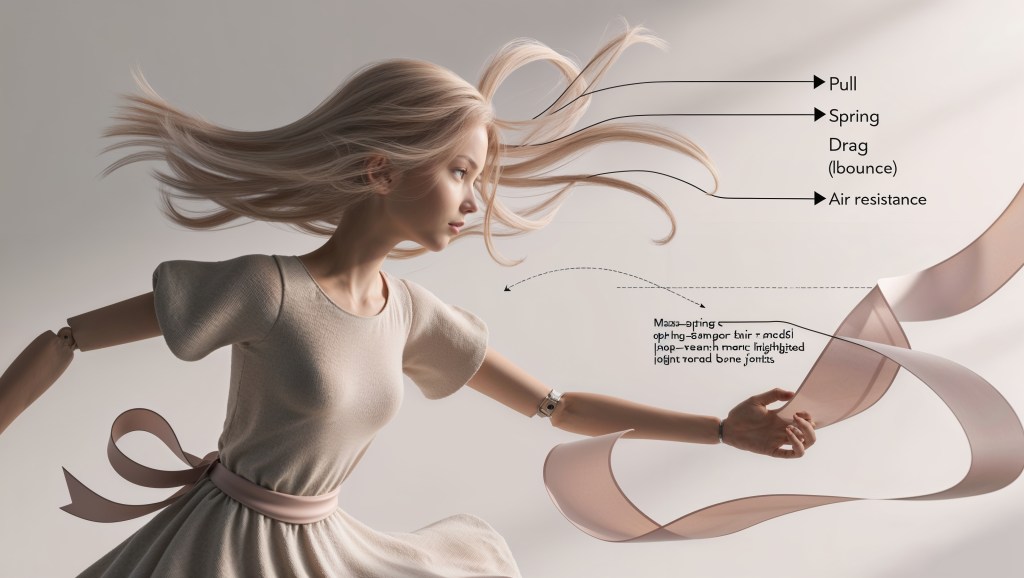
Ever noticed how a VTuber’s hair flows effortlessly as they gesture, or how a ribbon on their outfit sways with every turn of the head? That’s no accident; it’s the invisible hand of physics simulation powering that fluid, lifelike motion. At VTuberLab, we believe dynamic motion is what transforms 3D models from stiff puppets into expressive digital personalities.
In this deep dive, we will unpack physics simulation in VTuber avatars, explaining core principles, technical pipelines, tuning secrets, and why it matters for the emerging phygital landscape.
What Is Physics Simulation?
Physics simulation is the computational modeling of real-world forces and motion, like gravity, stiffness, and drag, used to animate soft parts of your avatar naturally. It’s built on:
- Newton’s Laws:
- Objects move until a force acts.
- Force equals mass × acceleration (F = ma).
- For every action, there’s an equal and opposite reaction.
- Mass-spring-damper systems: Imagine hairs or ribbons as chains of masses connected by springs and dampers—these follow soft-body dynamics to bend, stretch, and slowly return to rest.
- Numerical integration techniques: Techniques like Euler or Runge‑Kutta solvers compute motion over tiny time steps, ensuring stable simulation in real time.
These components are the heart of physics simulation, whether in game engines or VTuber tools.
Why Physics Simulation Matters for VTuber Avatars?
When you watch a VTuber’s model move, tiny nuances make all the difference. Without physics simulation, movement often feels stiff, artificial, and disconnected from reality. Imagine hair snapping unnaturally with every gesture, or skirts and ribbons clipping through the body, little glitches that break immersion. Worse yet, when everything moves the same, emotional expressiveness gets flattened, leaving both creators and audiences underwhelmed.
But bring in a solid physics simulation, and everything changes. Suddenly, hair sways with life, and ribbons dance in tune with motion. These details may seem small, but they breathe personality into animated models. A subtle jiggle bone reacting authentically to a laugh can convey emotions without a single word. It’s these micro-interactions that make the avatar feel present, human, even across a screen.
Key Benefits of Physics Simulation
- Realism: Hair, clothes, and accessories behave naturally, no clipping, no floaty motion.
- Expressiveness: Jiggle bones serve as emotional amplifiers, small physics equals big character.
- Immersion: In phygital or XR environments, motion aligns with real-world expectations, boosting presence and engagement
Jiggle Bones, PhysBones & Dynamic Motion
Imagine your avatar’s hair or scarf as a group of dancers, each strand is a performer with its own rhythm. VTubers breathe life into these parts using tools like Unity’s Dynamic Bones or VRChat’s PhysBones, which automate that second-layer motion we often describe as “jiggle.”
These systems let you tweak how gravity (known as pull) tugs the dancers down, how springy they bounce, and how much air resistance (drag) slows them. VRChat’s PhysBones, a popular open-source spin, has made creators’ setups distinctively lively, no rigid, stiff hair allowed.
A typical workflow might look like:
- Rig the strands—designate bone chains in Blender or Unity.
- Add the physics component—attach Dynamic or PhysBones to each chain.
- Tune settings & colliders—no clipping through the avatar’s body!
- Test live—watch the ribbon dance in real time using software like VSeeFace or Unity.
Tuning for Realistic Movement
Make physics simulation believable—not goofy or bland. Here’s how seasoned creators strike that balance:
Key Parameters to Master
- Pull (Gravity): Imagine a tail just swaying—ideal to keep pull < 0.2 so it doesn’t drop too fast.
- Spring: Add a little bounce (0.5–0.8) to give energy, without letting it swing wildly.
- Drag: Higher drag smooths movement; no jittery ends!
- Angle Limits: Lock movements under ≈ 20° to prevent the “noodle tail” effect.
Technical Pipeline: From Rig to Real-Time Stream
Let’s take a peek behind the curtains of your VTuber setup. Think of it like building an army of tiny helpers—every frame of your stream is a fresh mission!
🎬 The Setup Begins
First, in your 3D tool (Blender, Unity, etc.), you create bone chains for parts you want to move—like a ponytail, scarf, or earrings. These bones will be the “joints” puppet-perfect for subtle shifting.
⚙️ Add the Physics Component
Next, you attach a Dynamic Bone or PhysBone script—a little physics engine that brings motion life. This is the magic spark that makes things react to gravity, inertia, and momentum. Creators widely use these tools; tutorials like “How to Add Dynamic Bones to an Avatar in Unity” make it super approachable
🛠️ Set Parameters
Here’s where the real fun starts:
- Mass sets how heavy each bone feels.
- Pull simulates gravity’s tug.
- Spring adds bounce.
- Drag smooths things out.
- Colliders (capsules, spheres) prevent clipping through your avatar.
🔁 The Frame-by-Frame Dance
Each frame, think 30 to 60 times per second—the pipeline kicks in:
- Forces (gravity, inertia) are calculated.
- A numerical solver (like Euler integration) figures out bone positions.
- The system checks for collisions and adjusts.
- Bones update, and the model refreshes on screen.
🖥️ Rendering & Streaming
Your updated bone layout is sent to your avatar rig and streamed live—smooth and believable motion, no puppet-like stiffness.
Pro Tip
Many creators polish their physics in Unity or Blender using soft-body or cloth simulation, and then export the polished version to VTuber software. That way, your avatar enters the stream looking smooth and professional.
Game-Engine Foundations
Physics simulation in VTuber avatars leans heavily on the same engines powering blockbuster games:
- NVIDIA PhysX: A GPU-accelerated real-time engine for rigid and soft-body dynamics, cloth, and particles
- Bullet, Havok, Open Dynamics Engine (ODE), Project Chrono: All provide robust physics backends for soft- and rigid-body motion in games.
On platforms like VRChat—or in emerging phygital setups—these engines are tuned to leverage GPUs and multi-core CPUs. The result? Smooth, convincing motion occurs without crashing your streaming rig.
Balancing Realism & Performance
Physics simulation is powerful, but it can also be a resource hog. Here’s how creators ride that performance tightrope:
Optimize Bone Count
Fewer bones mean fewer physics calculations. By merging redundant chains, your avatar stays expressive but lighter on CPU/GPU usage.
Simplify Colliders
Capsules and spheres are much more efficient than complex mesh colliders. For example, swapping a mesh collider for a capsule can make collision checks several times faster.
Isolate Physics
Only animate parts your viewers see, leave out hidden hair strands or accessories that won’t show on stream. This reduces unnecessary computational load.
Use Level-of-Detail (LOD) Physics
Apply heavy simulation only where it counts, like close-up shots. Use simpler physics for distant or off-screen bones .
Community & Tools: Supercharge Your Physics Simulation Toolkit
Bringing your VTuber avatar to life with physics simulation is easier when you harness community knowledge, and the right tools.
Build-It-Yourself Tools
- PhysBones (Unity): An open-source alternative to Dynamic Bones in VRChat, adding lifelike gravity, drag, and collision physics to hair, ears, tails, and more.
- Dynamic Bones (Unity Asset): A creator-favorite for plug-and-play “jiggle” effects—just attach it, tweak settings, and watch secondary motion animate in real time.
- Blender Add-Ons (e.g. Wiggle Bones): Simulate soft-body movement during model preparation. Great for pre-baking motion before exporting to streaming tools.
Avatar Platforms with Physics Support
- VIVERSE Avatar Creator: A free tool that generates VRM avatars ready for streaming—though you’ll still need to attach physics components like PhysBones or Dynamic Bones afterward.
- thevtubers.com: It is a full-service VTuber avatar studio, offering custom 3D avatars that come fully rigged with facial controls and real-time soft-hair and cloth physics. It’s a fast, professional way to get a physics-savvy avatar without starting from scratch.
Community Wisdom & Learning
Forums like Reddit (r/VirtualYoutubers, r/VRChat) and creator Discord servers are rich with tuning advice, spring values, mass presets, and collider tricks gleaned from real user experiences. Tutorials such as “How to Add Dynamic Bones in Unity” make setup approachable visually.
Conclusion
Physics simulation is the secret ingredient bringing avatars to life, giving hair sway, clothing bounce, and dynamic motion that feels real. Built on game, engine foundations, fine-tuned via community wisdom, and accelerated by AI, physics is evolving your avatar from static mesh to responsive digital entity. As motion becomes more interactive and lifelike, it elevates viewer connection and immersion, turning streaming into a true performance medium. In this way, physics simulation bridges art and technology, empowering VTuber creators to craft digital personas that truly feel alive.


 VtuberLab
Leave a comment