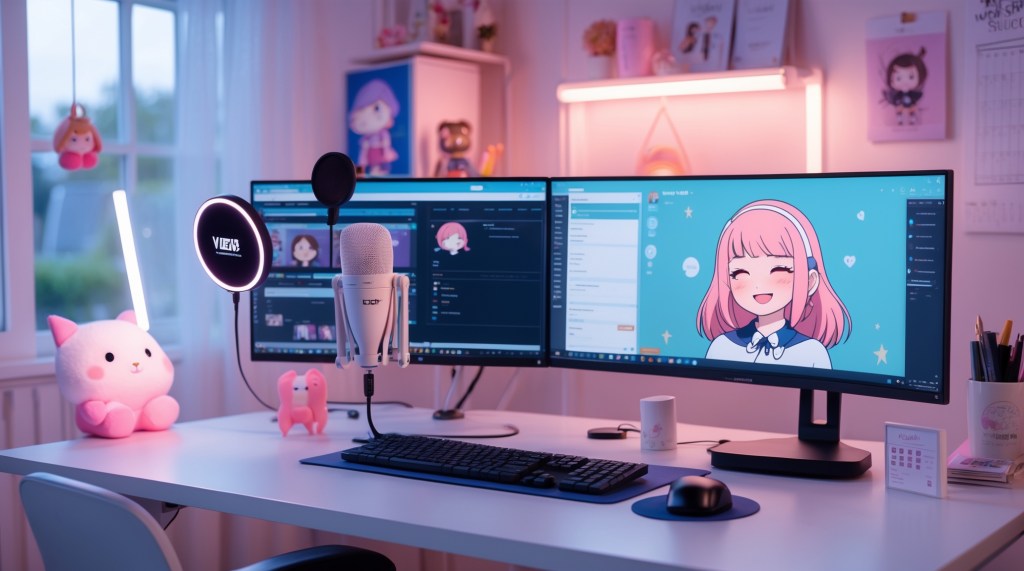
Becoming a VTuber in 2025 isn’t just about slapping on an anime avatar and hitting “Go Live.” It’s a creative evolution, where personality, tech, and storytelling collide in real-time. Whether you dream of streaming cozy gaming nights, quirky skits, or chaotic karaoke as your digital alter ego, this VTube guide will walk you through exactly how to become a VTuber, from scratch.
Even if you have zero experience in streaming or 3D modeling, this guide will help you build a complete VTuber setup, create a unique VTuber model, and launch your VTuber stream like a pro.
Why VTubing in 2025 Is Bigger Than Ever?
VTubing has grown from an internet curiosity into a full-blown cultural movement. What started with a handful of virtual idols in Japan has now gone global, with creators popping up on every major platform, from YouTube and Twitch to TikTok and Kick. Scroll through your feed in 2025, and you’ll see VTuber avatars hosting podcasts, streaming cozy game nights, teaching language lessons, or even producing animated music videos.
What’s driving this boom? Accessibility. New tools have made it incredibly easy for anyone to create a VTuber model, set up a stream, and start broadcasting—no 3D modeling skills or deep tech knowledge required.
At its core, VTubing combines creativity, community, and personal expression in a way that’s more flexible than traditional face-cam content. For many, it’s not just a hobby, it’s a career. And for beginners, there’s never been a better time to join the scene and make your mark.
Your VTuber Journey Starts Here: Step-by-Step Breakdown for Beginners
Thinking about becoming a VTuber? Don’t wait, 2025 is the best time to dive in, and this step-by-step guide will show you exactly how to start before the next wave explodes.
Step 1: Define Your VTuber Persona
Before touching any software, let’s start with the heart of your channel: you, or rather, your VTuber self.
Ask Yourself:
- What kind of content will you make? (Gaming, chatting, singing, ASMR, education?)
- What vibe or theme fits your persona? (Cute cat girl? Cyberpunk android? Chill slice-of-life streamer?)
- Will you use your real voice or a voice changer?
Crafting your VTuber persona is about choosing how you want to be perceived online. Remember: personality drives engagement. An interesting backstory or even simple character quirks can help viewers remember and return to your streams.
Step 2: Design Your VTuber Avatar
Once your persona is set, it’s time to bring it to life. Your VTuber avatar is your digital identity, and there are multiple ways to create one depending on your style and budget.
Option 1: Use a VTuber Avatar Maker (Free or Paid)
- VRoid Studio – Perfect for anime-style 3D avatars. Free and beginner-friendly.
- Ready Player Me – Offers more realistic or Western styles.
- Luppet or Animaze – Let you import models or start from templates.
Option 2: Commission a Custom Avatar
Want something truly unique? Commission a 2D or 3D VTuber model from an artist. Search on platforms like:
- Fiverr
- Twitter/X
- VTuber Discord communities
Pro Tip: Whether you’re using a free maker or commissioning a model, make sure your avatar reflects your branding and can emote well on stream.
Step 3: Choose Between 2D vs. 3D Models
Not all VTuber models are created equal. Here’s a quick breakdown:
2D (Live2D)
2D models are hand-drawn and rigged to mimic your facial movements, giving you a highly stylized and expressive look. They’re especially popular with anime-style VTubers and are typically used in VTube Studio. Perfect if you want charm, personality, and strong visual appeal without needing full-body movement.
They’re also less demanding on your PC, making them a great choice for beginners. Plus, there are tons of affordable assets and Live2D riggers available if you want to upgrade your look later.
3D (VRM, VRoid, etc.)
3D models offer full-body motion tracking and are ideal for dynamic content like dancing, VR games, or expressive physical gestures. These models work with platforms like VRChat, Luppet, and VSeeFace, giving you more freedom to move and interact in a 3D space.
While they require stronger hardware and setup, the immersion and versatility are unmatched. Great for creators who want to explore virtual worlds or perform in real time.
Choose what suits your content style and your computer’s specs. 2D models are less demanding on your hardware but still visually stunning.
Step 4: Set Up Face and Body Tracking
To make your VTuber avatar move with you, you’ll need tracking software and a webcam (or phone).
For Face Tracking:
- iPhone with Face ID + VTube Studio or Waidayo = high precision
- Standard webcam + VSeeFace (for 3D)
- Android apps like MeowFace or VTube Studio (newer versions)
For Full-Body Tracking (Optional):
- Leap Motion or VR trackers (like Vive)
- Used for dancing or interactive movement streams
VTuber streaming in 2025 is more responsive than ever. Even on a budget setup, you can achieve shockingly fluid animations with real-time expressions.
Step 5: Get the Right VTuber Setup
Let’s talk gear. You don’t need a high-end studio, but your VTuber setup needs to be reliable.
Basic VTuber Setup Checklist:
- PC or Laptop (with GPU)
- Webcam or iPhone (for tracking)
- Microphone – USB mic like Blue Yeti or XLR options
- Headphones – To prevent audio feedback
- VTubing Software
- Streaming Software – OBS Studio or Streamlabs
Your audio and avatar are equally important. A scuffed mic can ruin an otherwise polished VTuber stream. If you’re on a budget, prioritize audio quality over face tracking upgrades.
Step 6: Choose Your VTuber Software Stack
Here’s what powers your avatar behind the scenes:
Avatar Animation
For 2D avatars, VTube Studio is the go-to choice. It’s user-friendly, highly customizable, and works seamlessly with Live2D models, making it perfect for expressive anime-style VTubers.
For 3D models, popular options include VSeeFace, Luppet, and 3tene. These tools support real-time facial tracking, full-body movement (if you have VR equipment), and are widely used by VTubers looking for dynamic motion and realism in their streams.
Voice & Effects
To transform or enhance your voice in real-time, Voicemod is a powerful tool offering a wide range of voice changer presets.
NVIDIA Broadcast helps eliminate background noise and echo, making your audio cleaner and more professional. For more advanced users, REAPER and OBS Filters allow you to fine-tune your sound with equalizers, compressors, and effects for studio-quality voice output.
Streaming
OBS Studio is the industry standard for streaming, it’s free, reliable, and highly customizable, though it requires a bit of setup knowledge.
Streamlabs offers a more beginner-friendly interface with built-in themes and tools, but it can be more resource-intensive. Make sure your VTubing software works smoothly with your chosen model format. For example, Live2D avatars pair best with VTube Studio.
Step 7: Build Your Stream Overlay & Identity
You’re more than just an avatar, you’re a full content brand. Here’s how to complete the look of your VTuber streaming presence:
Must-Have Stream Assets:
- Animated overlays
- Background music (BGM)
- Stream alerts (donations, subs)
- Chat box
- Starting/Ending/Be Right Back screens
You can DIY these with tools like Canva, StreamElements, or Nerd or Die templates, or commission an artist for custom work.
Step 8: Set Up Your Channel (YouTube, Twitch, etc.)
Choose your main platform and set up a channel that matches your VTuber brand. Add your VTuber name, a short bio, and use your avatar as the profile picture. Upload a banner, add important links, and include a stream schedule or intro video. This helps new viewers understand who you are and what to expect.
Platform Tips:
- YouTube is great for discoverability and archived content.
- Twitch shines for live interaction and monetization.
- Kick and TikTok LIVE are emerging options for niche growth.
Want to grow faster? Simulcast on multiple platforms using Restream.io or OBS multi-output plugins.
Step 9: Do a Test Stream
Before your debut, do a private or unlisted test stream to check:
Lip sync and face tracking: Make sure your avatar’s mouth and expressions match your speech smoothly using accurate face tracking tools.
Mic volume and quality: Check that your microphone volume is clear, without distortion or background noise, for a professional stream experience.
Overlay visibility: Ensure your overlays, alerts, and chat boxes are visible but not distracting or covering important parts of the screen.
Audio sync between you and the game/BGM: Test that your voice, game audio, and background music are properly balanced and synchronized for a smooth viewing experience.
Nerves are normal, but technical issues shouldn’t steal your spotlight. Iron out bugs early so your actual VTuber stream can shine.
Step 10: Go Live and Join the VTubing Community
Now the fun begins. Launch your debut stream, introduce your character, and start connecting with viewers. But don’t stream in a vacuum.
Tips to Grow Your VTuber Channel:
- Post on Twitter, TikTok, Reddit (like r/VirtualYoutubers)
- Collaborate with other VTubers
- Join VTuber Discord servers
- Repurpose stream clips for short-form content
Consistency beats perfection. Even if you start small, showing up regularly and improving each stream will build your audience over time.
Final Thoughts
Learning how to become a VTuber in 2025 means embracing creativity, tech, and a bit of chaos. But the reward? A vibrant, welcoming space where you can express your wildest ideas, build a following, and maybe even turn your digital dreams into a career.
Your VTuber model is just the vessel, your personality is the soul of your content. Don’t wait for perfection. VTube now, improve along the way. Whether you’re just testing the waters or ready to go all in, the world of VTubing is more accessible and exciting than ever.


 VtuberLab
Leave a comment